Use a small, predictable CSV
Export your spreadsheet as comma-separated UTF-8 CSV. Put the name in the first column and an optional weight in the second. Use 1–500 entries, names up to 80 characters and positive weights up to 10,000. The file must be at most 200 KB.
A blank weight means 1. Quoted commas and doubled quotation marks are supported; line breaks and tabs inside a name are not. Remove unrelated spreadsheet columns before exporting.
Name,Weight
Avery,1
"Chen, Mei",2
Sam,1
Sam,3Preview, then replace
- Open Names, or Layers in Fate. In Workspace, find the ring you want to edit.
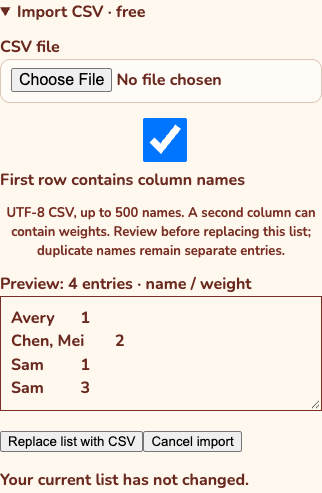
- Expand Import CSV · free and choose your file.
- Check First row contains column names if the first row is a header. Common English headers are detected, but the checkbox is yours to change.
- Review the entry count, names and weights. The file picker resets after reading; use the preview and status to confirm the load. Choose Replace list with CSV to apply, or Cancel import to leave the current list alone.
Know what replacement does
Replacement creates a new roster. It does not merge the CSV into existing names or carry old entry images into new entries. Export a backup first if you need the previous version.
Identical names remain separate entries, so they can represent different tickets. Remove duplicates is a separate, confirmed action. In Fate, import affects only the selected ring. If the list or selected ring changes during preview, choose the file again.
Check the imported result
ONE MORE THING
Common questions
Why won’t my CSV import?
Check UTF-8 encoding, comma separators, one or two columns, the 200 KB limit and 1–500 entries. Weights must be positive numbers no greater than 10,000. A rejected file leaves the current list unchanged. Export an Excel or Numbers workbook as CSV first; .xlsx is not accepted.
Link to this answerWhy did the same name appear twice?
CSV import intentionally keeps duplicates as separate entries. They may be extra tickets. If you want one entry per exact name, use Remove duplicates, review the confirmation and keep the first entry’s weight. Undo list change can restore that organization change.
Link to this answer